
Business Outcomes Powered by IT
Fort Worth Outsourced IT Support & IT Services
Let our team at Inman Technologies provide you with the best IT support and solutions to increase your profitability and allow you to focus on growing your business.
Business Outcomes Powered by IT
Fort Worth Reliable Outsourced
IT Support & IT Services
Let our team at Inman Technologies provide you with the best IT support and solutions to increase your profitability and allow you to focus on growing your business.


How Can We Help?
Schedule a 15-minute call to figure out if we're a good fit for your business.

Your Neighborhood IT Department

“Inman Technologies is always available for our fast paced environment. It is so important today to have a knowledgeable IT team at our finger tips. Give them a call today!”

“Inman Technologies is outstanding for all of our IT needs. Sean is quick to respond to any issue and easy to work with. Would highly recommend.”

Courtney Odom
Owner of Patten-Odom CPA
“Inman Technologies is always available for our fast paced environment. It is so important today to have a knowledgeable IT team at our finger tips. Give them a call today!”

Dawn Knox
Business Manager at Legacy Electric
“This company is great! Our rep Sean is always a call away when we need him to fix our issues. Definitely a great company to work with and Sean especially is the best!!”

Samantha Gutierrez
Office Manager at Turf and Soil Management
I have had the good fortune to work with Inman Technologies for the past two years where they have managed and supported a full range of IT services from basic computer setup and software management to a complete overhaul or our servers and security protocols. Above all, we have developed a relationship with Sean and his team due to their thoroughness and quick response to all our needs.

Bobby Snyder
President of Construction at Ashton Gray
Inman Technologies not only understands tech services, they understand hospitality. They understand their clients and that's why I will forever use Inman Tech. Response times are fast and they always have a solution!

Cole Smith
Director of Leasing at Ashton Gray
“Inman Technologies is the best. Not only from the outstanding work but the relational investment they make in their clients!”

Landon Pickering
Lead Pastor at Trademark Church
Inman technologies has done such a great job securing our company technologies. Being a small company that grew quickly we needed a professional company that didn't cost us a fortune to take over our IT infrastructure. Sean was it!

Amanda Taylor
Vice President at Legacy Electric
Why Choose Us
We Listen
We take a genuine approach to best understand your business by listening to your needs and simplifying the entire experience.
We Discover
We do a deeper dive into your current processes, network, and infrastructure to identify strengths, weaknesses, and overall IT needs.
We Recommend
We take our findings from the assessments and recommend an IT approach that will best support your business needs and goals.
We Improve
We keep your technology environment constantly improving as needed to help you maintain a competitive edge in your industry.
Client Success Stories

"I have had the good fortune to work with Inman Technologies for the past two years where they have managed and supported a full range of IT services from basic computer setup and software management to a complete overhaul or our servers and security protocols.
Above all, we have developed a relationship with Sean and his team due to their thoroughness and quick response to all our needs."
Bobby Snyder, President of Construction
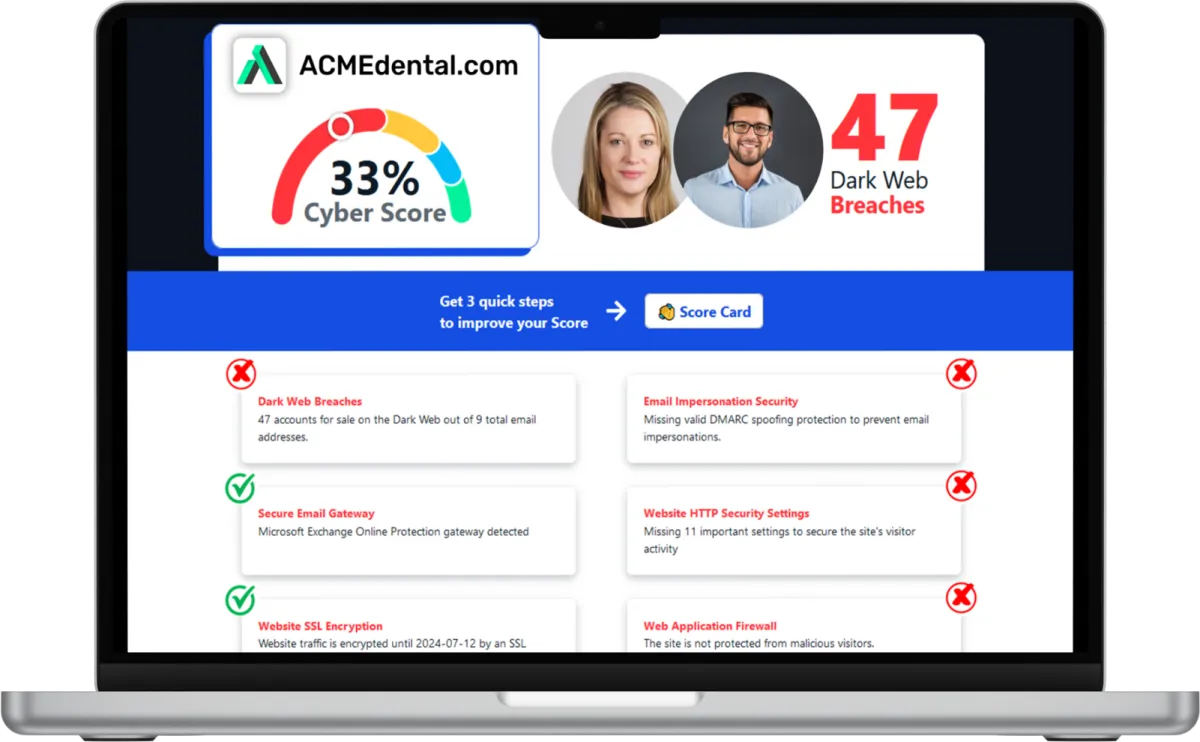
Want to see your Score? Get it in 30 seconds!
If You’ve Been Dealing with IT Challenges,
You’re Not Alone

Sean Inman
Founder & CEO
Inman Technologies is Here to Help.
Inman Technologies is a leading managed IT service provider in Fort Worth, TX, offering a comprehensive selection of outsourced IT support and IT services to businesses in Fort Worth, TX, and the surrounding areas, including Aledo, Willow Park, Hudson Oaks, and Weatherford, TX, and Oklahoma City and Edmond, OK. We specialize in providing IT support and Cybersecurity services to meet the unique needs of businesses.
Call 682-882-9344 today for comprehensive cybersecurity and managed IT services tailored to your needs.
Schedule an Appointment Today
Our Services
We monitor, maintain and manage your IT systems around-the-clock so you can focus on growing your business.
We provide robust protection against cyber threats, ensuring the confidentiality, integrity and availability of your data.
We offer assistance with any sort of IT project - ensuring it's completed on time and on budget.
Harness the Power of AI for Your Business
At Inman Technologies, we bring cutting-edge AI solutions to businesses of all sizes. Our AI as a Service offerings are designed to simplify your operations, enhance customer experiences, and drive measurable growth. From automating customer interactions to optimizing your marketing strategies, we deliver secure, tailored AI tools that make your business smarter and more efficient.
What Clients Say About Us
Your Complete IT Solution Partner
I have had the good fortune to work with Inman Technologies for the past two years where they have managed and supported a full range of IT services from basic computer setup and software management to a complete overhaul or our servers and security protocols. Above all, we have developed a relationship with Sean and his team due to their thoroughness and quick response to all our needs.
President of Construction at Ashton Gray
Bobby Snyder
Trustworthy Partner, a Good Company with Integrity, that Cares
Inman Technologies has been the welcome answer for everything IT. Sean and his teams experience, knowledge, and guidance has been second to none. Some firms that we have worked with in the past specialize in one arena or another and have extraordinary fees associated with their services. Not Inman Technologies. iCloud Storage, Proprietary Servers & Software, Firewalls, and Security etc. You name it they can take care of all your needs and then some. Finally a firm that can take care of all our needs and source all the electronics necessary to make our IT needs run safely and more efficiently. We look forward to a successful relationship with one another for many years to come.

David Terres
Vice President at Ramon Franklin
Response times are fast and they always have a solution!
Inman Technologies not only understands tech services, they understand hospitality. They understand their clients and that's why I will forever use Inman Tech. Response times are fast and they always have a solution!
Cole Smith
Director of Leasing at Ashton Gray
Inman Technologies Delivers Affordable Excellence
Inman technologies has done such a great job securing our company technologies. Being a small company that grew quickly we needed a professional company that didn't cost us a fortune to take over our IT infrastructure. Sean was it!
Amanda Taylor
Vice President at Legacy Electric
Partners and products we support to deliver unparalleled productivity:




Business Technology Insights
Explore expert insights, trends, and expert advice on the ever-evolving landscape of information technology. Dive in to discover how we leverage cutting-edge solutions to empower businesses and drive innovation.

9 Signs That Your Smart Home Device Has Been Hacked
Smart home devices are becoming more popular and convenient. But they also pose some serious security risks.

5 Cybersecurity Predictions for 2024 You Should Plan For
Cybersecurity is a constantly evolving field. There are new threats, technologies, and opportunities emerging every year.

Workspaces, a VPN & More – Learn the Newest Microsoft ...
Microsoft Edge continues to redefine user experiences. This is due to Microsoft’s commitment to innovation.

AI Policy Playbook for Small Businesses: 5 Rules to Safely Use ChatGPT and Generative AI
Your employees are already using AI.
They’re pasting emails into ChatGPT to “rewrite this more professionally,” feeding it snippets of proposals, or asking it to summarize long PDFs. That’s the reality in 2025.
The question isn’t “Will we use AI?”
It’s “Will we use AI in a way that protects our data, our clients, and our reputation?”
That’s what an AI policy is for.
In this playbook, we’ll walk through five practical rules you can use to govern tools like ChatGPT and other generative AI in your business—so you can capture the upside of AI without turning it into a security or compliance nightmare.
Why Your Business Needs an AI Policy Now (Not “Someday”)
Most organizations are behind the curve on AI governance:
Employees start using AI informally long before leadership sets any rules.
Sensitive information ends up in AI prompts without anyone realizing it.
No one knows which tools are “approved” or how those tools handle data.
Leaders can’t answer simple questions like, “Where are we using AI today?”
That combination—high enthusiasm, low oversight—is where companies get burned.
A clear AI policy changes that. It:
Protects confidential and regulated data
Reduces legal and compliance risk
Builds client trust
Gives your team confidence to use AI, instead of guessing what’s allowed
Turns AI from a risky experiment into a reliable business asset
Let’s turn this into something tactical.
Rule 1: Decide Exactly Where AI Is Allowed (and Where It Isn’t)
If your only AI policy is “be smart,” you don’t have a policy.
Start by answering two questions:
Where do we want AI to help?
Where is AI absolutely off-limits?
Step 1: Map “Green Light” Use Cases
List specific, approved use cases by department. For example:
Sales & Marketing
Drafting social posts, emails, and blog outlines
Repurposing existing approved content into different formats
Operations
Summarizing internal procedures or meeting notes
Drafting job descriptions from provided requirements
Customer Service
Drafting suggested replies (with human review)
Building internal FAQ drafts based on existing documentation
Step 2: Define “Red Light” Areas
Just as critical: define where AI cannot be used.
Common red zones:
Any client confidential or regulated data (financial, medical, legal, etc.)
Information covered by NDAs or contractual secrecy clauses
Credentials, internal URLs, system details, or security configurations
Anything you’d be uncomfortable seeing in the wild on the internet
Step 3: Put It in Plain Language
Your team shouldn’t need a lawyer to understand the policy. Example:
“You may use AI tools to draft content, summarize non‑confidential information, and brainstorm ideas. You may not enter client names, financial data, passwords, proprietary code, or any information covered by an NDA into public AI tools.”
Make it short, clear, and easy to remember.
Rule 2: Protect Data Every Time Someone Prompts an AI Tool
Every AI prompt is a data transfer.
If that prompt includes client details, internal strategy, or anything sensitive, you’ve just shared it with a third‑party service—whether you meant to or not.
Build a Simple Data-Protection Rule Set
At minimum, teach your team three data categories:
Public: Already on your website, social media, or marketing material
Internal: Day‑to‑day operational info that should stay inside the company
Confidential: Client data, financials, security details, regulated information
Then set the rule:
Only “Public” information goes into public AI tools.
“Internal” and “Confidential” data may only be used with approved, secured AI platforms (if you have them)—and even then, only under defined conditions.
Practical Prompts vs. Risky Prompts
✅ Safe Example:
“Rewrite this paragraph from our public website to sound more conversational.”❌ Risky Example:
“Draft an email to our client, ABC Manufacturing, about their overdue invoice for $54,320 and reference their order from March 3rd.”
The second example includes client identity + financial details—that should never go into a public AI tool.
Technical Controls (Where Inman Technologies Can Help)
Policies are important, but people make mistakes. That’s where technical controls add real protection:
Data Loss Prevention (DLP) to detect and block sensitive info leaving your environment
Conditional access and security controls around AI tools
Approved, enterprise-grade AI platforms integrated with Microsoft 365 or other systems
Policy + technology = real protection.
Rule 3: Keep Humans in Charge of Decisions and Output
AI is fast. Confidence is high. Accuracy is… variable.
Generative AI will:
Invent facts
Misinterpret nuance
Get tone completely wrong
Produce content that looks polished but is legally risky
That’s why your policy must state clearly:
“AI can assist, but humans remain accountable for all decisions and external communication.”
Require Human Review for Key Outputs
At minimum, require human review when AI is used for:
Anything sent to clients or vendors
Marketing or sales collateral
Contracts, legal language, or compliance-related content
Policies, procedures, and internal standards
Reports that inform financial, operational, or staffing decisions
The reviewer is responsible for checking:
Accuracy and completeness
Tone and professionalism
Legal and contractual implications
Alignment with your brand and values
A Note on Ownership and Copyright
Laws are still evolving, but one point is clear: the more purely AI‑generated the content, the weaker your claim to unique ownership.
To reduce risk:
Treat AI as a drafting assistant, not the final author
Require meaningful human editing, contribution, and judgment
Document when and how AI was used in important work
That combination makes your output more defensible and more valuable.
Rule 4: Track, Log, and Audit AI Usage
You can’t govern what you can’t see.
Most organizations have zero visibility into:
Which AI tools are in use
What kind of data is being entered
Which teams are heavily reliant on AI
Where AI-produced errors are causing rework or risk
What To Log
Aim to track, at least for your approved tools:
Who is using AI (user or department)
When it’s being used
Which tools or models are used
General purpose (e.g., “drafting emails,” “summarizing docs”)
Any major outputs tied to important business decisions
You don’t have to log every word of every prompt to get value. Even high‑level logging gives you:
An audit trail for compliance and disputes
Insight into where AI is saving time—or causing problems
Data to justify investments in better AI platforms
Centralize the Tools
Shadow AI (everyone installing their own extensions and tools) is a governance killer.
Your AI policy should:
Define which AI tools are approved
Block or discourage unapproved tools where possible
Provide easy access to the official tools so people don’t hunt for risky workarounds
Rule 5: Make AI Governance a Continuous Practice
AI moves too fast for a “set it and forget it” policy.
New tools launch every week. Regulations shift. Vendors change how they store and train on user data. Your business, clients, and risk profile evolve.
Treat AI governance as an ongoing program, not a one‑time document.
Set a Review Rhythm
We recommend:
Quarterly: Light review of AI usage, incidents, and toolset
Annually: Full policy review with leadership, HR, legal/compliance, and IT
During each review, ask:
Where is AI helping us the most?
Where has AI created problems, rework, or risk?
Do we need to update our “green light / red light” use cases?
Are employees clear on what’s allowed?
Have regulations or vendor terms changed?
Train, Retrain, Repeat
You can’t rollout an AI policy once, send one email, and declare victory.
Build AI into your security awareness and compliance training:
Onboarding: Introduce AI policy and approved tools
Annual training: Update on new risks and best practices
Targeted refreshers: After any notable AI incident or policy change
The message should be simple:
“We want you to use AI. We just want you to use it safely.”
AI Policy Starter Checklist (You Can Use This Today)
Here’s a simple checklist you can adapt:
Define Purpose
Why are we using AI? (productivity, quality, innovation, etc.)
Identify Approved Tools
List the AI tools employees can use
Document where and how each tool is allowed
Set Data Rules
What can never be entered into AI tools?
How do we classify Public / Internal / Confidential data?
Clarify Human Oversight
Where is human review required before anything is shared externally?
Who is accountable for final outputs?
Implement Technical Controls
DLP, access controls, logging, and monitoring
Approved integrations with Microsoft 365 and other core systems
Establish Logging and Reporting
What do we track?
Who reviews usage and when?
Create a Review Cadence
Quarterly and annual review schedule
Owners for updating the policy
Train Your Team
Onboarding training
Regular refreshers and incident-driven updates
Even a “version 1.0” policy built around this checklist puts you miles ahead of businesses running on AI chaos.
Turning Responsible AI Use into a Competitive Advantage
AI isn’t just a shiny tool. It’s infrastructure.
Companies that win with AI will be the ones who:
Use it aggressively—but safely
Protect their clients’ data and trust
Move faster because their policies are clear and their tools are aligned
If you’re a growing business in Fort Worth or anywhere in Texas, that’s where Inman Technologies comes in.
We help organizations:
Design practical, plain‑English AI policies
Align AI governance with cybersecurity, compliance, and existing IT standards
Implement technical controls that back up the policy with real protection
Train teams so AI becomes a force multiplier, not a liability
If you’re serious about putting AI to work—without losing control of your data or your reputation—let’s talk.
Ready to build your AI Policy Playbook?
Schedule an AI governance and security assessment with Inman Technologies and turn responsible AI into a lasting competitive advantage.

Frequently Asked Questions
What are the benefits of cybersecurity services?
Cybersecurity services offer numerous advantages for businesses. They protect your sensitive data from unauthorized access, safeguard your systems from cyber threats, ensure compliance with industry regulations, and enhance the overall resilience of your IT infrastructure.
What are managed IT service providers?
Managed IT service providers handle your IT needs, allowing you to focus on your core business operations. They provide proactive IT support, network monitoring, data backup, cybersecurity, and other essential services to ensure the smooth functioning of your IT environment.
What are IT security services?
IT security services encompass measures and practices to protect your systems, networks, and data from potential threats. These services include but are not limited to network security, data encryption, access controls, vulnerability assessments, penetration testing, and incident response.
What makes our IT Support different from other MSPs?
At Inman Technologies, we stand out as a premier outsourced IT support provider in Fort Worth through our unique approach to technology services. Unlike other providers, we don't believe in one-size-fits-all solutions or long-term contracts that lock you in. Instead, we offer:
✔️ Flexible Service Model
✔️ Comprehensive Support
✔️ Innovation Focus - AI-powered solutions
✔️ Local Expertise
Whether you're a small tax office or a growing enterprise, our outsourced IT support services provide the flexibility, expertise, and personal attention your business needs to thrive in today's digital landscape.
📅 Schedule an Appointment With Us to learn more about our unique approach to IT support.
Share Your IT Burdens With Us
Spend less time on IT problems and more time growing your business. Let’s get to know each other and determine how our partnership could grow. With us on your side, develop customized security plans, stronger communication strategies, and a better plan for the future.
Click the button below to schedule your appointment. We’re ready to jumpstart your IT journey.
© Copyright 2026 Inman Technologies | Privacy Policy | SMS Opt-In


