Business Outcomes Powered by IT
Fort Worth Outsourced IT Support & IT Services
Let our team at Inman Technologies provide you with the best IT support and solutions to increase your profitability and allow you to focus on growing your business.
Schedule an Appointment
It’s our job to help your business save money, work faster, and
focus on what's most important: driving growth. Schedule a 15-minute call to see if we are a good fit.
IT Support Fort Worth
Outsourced IT Support & IT Services
Our IT support gives your business a more reliable way to manage day-to-day technology needs.


How Can We Help?
Schedule a 15-minute call to figure out if we're a good fit for your business.

Your Neighborhood IT Department

“Inman Technologies is always available for our fast paced environment. It is so important today to have a knowledgeable IT team at our finger tips. Give them a call today!”

“Inman Technologies is outstanding for all of our IT needs. Sean is quick to respond to any issue and easy to work with. Would highly recommend.”

Courtney Odom
Owner of Patten-Odom CPA
“Inman Technologies is always available for our fast paced environment. It is so important today to have a knowledgeable IT team at our finger tips. Give them a call today!”

Dawn Knox
Business Manager at Legacy Electric
“This company is great! Our rep Sean is always a call away when we need him to fix our issues. Definitely a great company to work with and Sean especially is the best!!”

Samantha Gutierrez
Office Manager at Turf and Soil Management
I have had the good fortune to work with Inman Technologies for the past two years where they have managed and supported a full range of IT services from basic computer setup and software management to a complete overhaul or our servers and security protocols. Above all, we have developed a relationship with Sean and his team due to their thoroughness and quick response to all our needs.

Bobby Snyder
President of Construction at Ashton Gray
Inman Technologies not only understands tech services, they understand hospitality. They understand their clients and that's why I will forever use Inman Tech. Response times are fast and they always have a solution!

Cole Smith
Director of Leasing at Ashton Gray
“Inman Technologies is the best. Not only from the outstanding work but the relational investment they make in their clients!”

Landon Pickering
Lead Pastor at Trademark Church
Inman technologies has done such a great job securing our company technologies. Being a small company that grew quickly we needed a professional company that didn't cost us a fortune to take over our IT infrastructure. Sean was it!

Amanda Taylor
Vice President at Legacy Electric
How We Keep Systems Running
Initial Assessment
We review your current setup, from network configuration to software licensing, so we know exactly where IT support is needed most before making changes.
Ongoing Monitoring
Our team watches servers, networks, and endpoints around the clock, flagging unusual activity before it becomes downtime.
Fast Resolution
When something goes wrong, our help desk resolves it quickly, whether that means a remote fix or an on-site visit from a technician in Fort Worth.
Clear Reporting
We document what we found, what we fixed, and what we recommend next, so businesses in Fort Worth always know the state of their systems.
Client Success Stories

"I have had the good fortune to work with Inman Technologies for the past two years where they have managed and supported a full range of IT services from basic computer setup and software management to a complete overhaul or our servers and security protocols.
Above all, we have developed a relationship with Sean and his team due to their thoroughness and quick response to all our needs."
Bobby Snyder, President of Construction

When Minor Tech Issues Become Daily Frustrations
A slow computer here, a printer that will not connect there. On their own, these feel minor. But at a law firm or construction company in Fort Worth, small interruptions pull staff away from billable work or job coordination.
Left unresolved, these issues repeat. A network that slows down every afternoon becomes the norm instead of a problem to fix, and files get saved in different places because nobody trusts the shared drive. Without steady IT support, small frustrations become habits that cost time every week.
Why Businesses in Fort Worth Trust Our Process
Businesses in Fort Worth come to us after dealing with IT support that only reacts when something breaks. We take a different approach by first assessing your network, security, recurring issues, and how your team works day to day.
We build a plan based on what your environment actually needs. We document changes, address the causes behind repeated problems, and prioritize improvements that make sense for your operations. This gives your team IT support with clearer direction, fewer recurring issues, and a setup that is easier to manage over time.

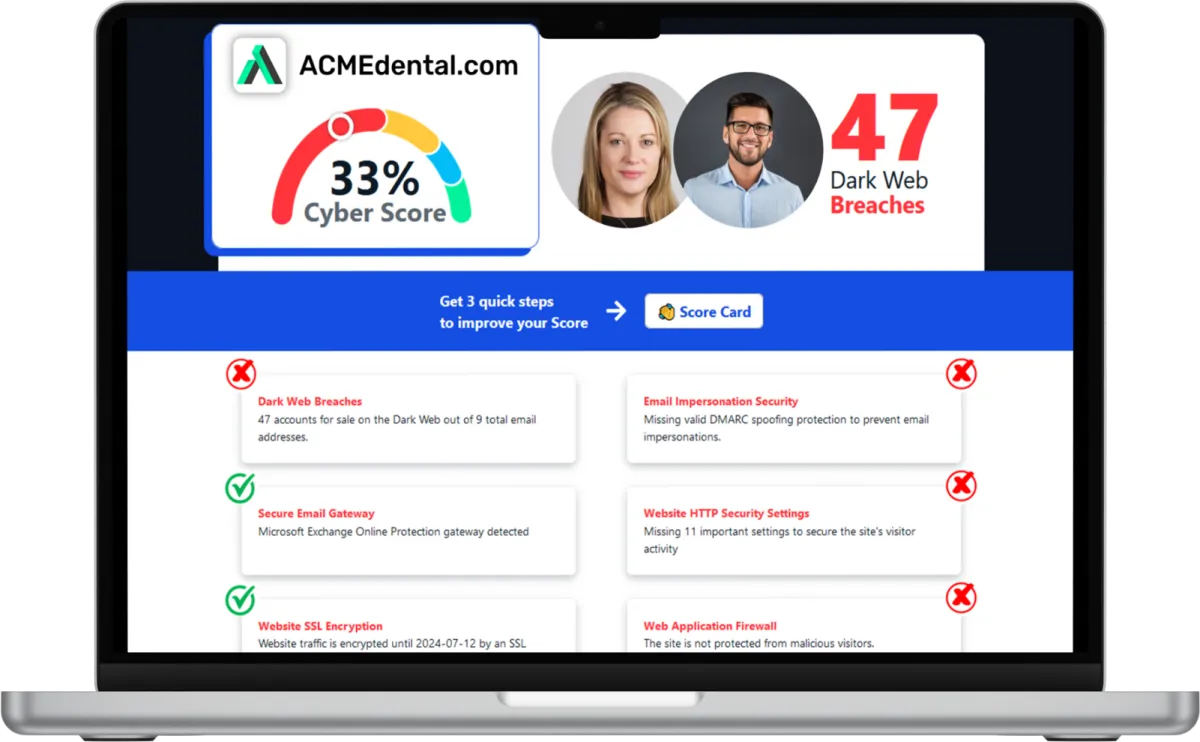
Want to see your Score? Get it in 30 seconds!
If You’ve Been Dealing with IT Challenges,
You’re Not Alone

Sean Inman
Founder & CEO
Inman Technologies is Here to Help.
Inman Technologies is a leading managed IT service provider in Fort Worth, TX, offering a comprehensive selection of outsourced IT support to businesses in Fort Worth, TX, and the surrounding areas, including Aledo, Willow Park, Hudson Oaks, Weatherford, TX, and Oklahoma City and Edmond, OK. We specialize in providing IT support and Cybersecurity services to meet the unique needs of businesses.
Call 682-882-9344 today for IT support tailored to your needs.
Schedule an Appointment Today
Our IT Support Services
Our IT services provide a structured approach through system monitoring, responsive help desk support, and one clear point of contact.
We identify recurring problems, address their causes, and keep support organized so your team can stay focused and productive each day.
IT Help Desk
Your team should reach a real person when something breaks. Too often, businesses wait on hold or send an email into a queue with no timeline. Our IT help desk gives your staff in Fort Worth a direct line to support.
Direct access to our help desk during business hours.
Support for common software, hardware, and login issues.
Remote troubleshooting for most everyday requests.
Escalation to a technician when needed.
Network Management
A stable connection should be something you never think about. Instead, many offices in Fort Worth deal with dropped connections, slow transfers, and strained Wi-Fi. We manage your network so it holds up under daily use.
Monitoring for outages, slowdowns, and unusual traffic.
Configuration of routers, switches, and access points.
Regular checks on network performance.
Documentation of your setup for faster troubleshooting.
Cybersecurity Services
Every business wants confidence that client and case files are protected. But threats evolve, and one weak password or outdated system can open the door to a breach. Our cybersecurity reduces that risk at every layer.
Endpoint protection installed across company devices.
Email filtering to help reduce phishing attempts.
Regular updates to close known vulnerabilities.
Guidance on access controls and passwords.
Backup and Disaster Recovery
Losing a day of case files or project records can set a team back weeks. Backups that run occasionally, or go untested, offer false security. We set up routines that help you recover quickly.
Scheduled backups of critical files and systems.
Backup verification so data is recoverable.
Recovery support after accidental deletion.
Storage options built around how your team works.
Cloud Services
Teams splitting time between office, job sites, and home need file access without friction. When cloud tools are set up poorly, people end up emailing documents or losing versions. We configure systems that keep everyone aligned.
Setup and management of cloud email and file storage.
Access controls so the right people see the right files.
Support for remote and hybrid schedules.
Migration assistance when moving from local servers.
IT Consulting
Growing a business often means outgrowing systems that used to work fine. Without a plan, technology decisions get made in a hurry, right when something breaks. We provide IT consulting that looks ahead, so upgrades happen on your timeline.
Technology roadmaps aligned with growth plans.
Recommendations based on how your team works.
Guidance on replacement timing for hardware and software.
Support for planning office moves or expansions.
Harness the Power of AI for Your Business
At Inman Technologies, we bring cutting-edge AI solutions to businesses of all sizes. Our AI as a Service offerings are designed to simplify your operations, enhance customer experiences, and drive measurable growth. From automating customer interactions to optimizing your marketing strategies, we deliver secure, tailored AI tools that make your business smarter and more efficient.
What Clients Say About Us
Your Complete IT Solution Partner
I have had the good fortune to work with Inman Technologies for the past two years where they have managed and supported a full range of IT services from basic computer setup and software management to a complete overhaul or our servers and security protocols. Above all, we have developed a relationship with Sean and his team due to their thoroughness and quick response to all our needs.
President of Construction at Ashton Gray
Bobby Snyder
Trustworthy Partner, a Good Company with Integrity, that Cares
Inman Technologies has been the welcome answer for everything IT. Sean and his teams experience, knowledge, and guidance has been second to none. Some firms that we have worked with in the past specialize in one arena or another and have extraordinary fees associated with their services. Not Inman Technologies. iCloud Storage, Proprietary Servers & Software, Firewalls, and Security etc. You name it they can take care of all your needs and then some. Finally a firm that can take care of all our needs and source all the electronics necessary to make our IT needs run safely and more efficiently. We look forward to a successful relationship with one another for many years to come.

David Terres
Vice President at Ramon Franklin
Response times are fast and they always have a solution!
Inman Technologies not only understands tech services, they understand hospitality. They understand their clients and that's why I will forever use Inman Tech. Response times are fast and they always have a solution!
Cole Smith
Director of Leasing at Ashton Gray
Inman Technologies Delivers Affordable Excellence
Inman technologies has done such a great job securing our company technologies. Being a small company that grew quickly we needed a professional company that didn't cost us a fortune to take over our IT infrastructure. Sean was it!
Amanda Taylor
Vice President at Legacy Electric
Partners and products we support to deliver unparalleled productivity:



Business Technology Insights
Explore expert insights, trends, and expert advice on the ever-evolving landscape of information technology. Dive in to discover how we leverage cutting-edge solutions to empower businesses and drive innovation.

9 Signs That Your Smart Home Device Has Been Hacked
Smart home devices are becoming more popular and convenient. But they also pose some serious security risks.

5 Cybersecurity Predictions for 2024 You Should Plan For
Cybersecurity is a constantly evolving field. There are new threats, technologies, and opportunities emerging every year.

Workspaces, a VPN & More – Learn the Newest Microsoft ...
Microsoft Edge continues to redefine user experiences. This is due to Microsoft’s commitment to innovation.

Top 10 Ways to Boost Business Productivity with Microsoft 365 Tools in 2025
At Inman Technologies, we regularly work with companies that are missing out on the full potential of Microsoft 365. From real-time collaboration to built-in cybersecurity and automation tools, Microsoft 365 offers immense value—if you know how to use it strategically. Below are 10 powerful ways your business can increase productivity, enhance team collaboration, and improve security with Microsoft 365. We’ve also included minimum license requirements to ensure you can take advantage of these tools based on your current subscription tier.
1. Make Microsoft Teams Your Central Communication Hub
Minimum License: Pre-April 2024: Microsoft 365 Business Basic or higher; Post-April 2024: Separate Teams Essentials or Teams Enterprise license required
Microsoft Teams consolidates chat, meetings, file sharing, and app integrations into one platform. It streamlines internal communication and reduces dependency on scattered tools. With shared calendars, file storage via OneDrive and SharePoint, and seamless video conferencing, Teams is a must-have for modern, hybrid work environments.
2. Automate Workflows with Power Automate
Minimum License: Basic automation: Microsoft 365 Business Basic; Recommended: Business Standard or Microsoft 365 E3
Power Automate helps eliminate repetitive tasks by automating approvals, notifications, file management, and CRM updates. Whether you’re routing support tickets or syncing marketing data, automation saves time and reduces manual errors.
3. Organize Your Thoughts with OneNote
Minimum License: Microsoft 365 Business Basic or higher
OneNote acts as your business’s digital brain—ideal for storing meeting notes, client insights, checklists, and brainstorming sessions. Notebooks can be shared across teams and are fully integrated with Outlook and Teams.
4. Collaborate in Real Time with Co-Authoring
Minimum License: Online editing: Business Basic; Desktop co-authoring: Business Standard or higher
Multiple users can work on the same Word, Excel, or PowerPoint file at the same time, with changes reflected in real time. Files must be saved in OneDrive or SharePoint for this to work. It’s a game-changer for fast-moving projects and eliminates version-control issues.
5. Streamline Appointments with Microsoft Bookings
Minimum License: Microsoft 365 Business Standard or higher
Microsoft Bookings offers a branded, self-service scheduling page that syncs directly with Outlook calendars. Clients can book time based on your team’s availability, reducing the back-and-forth of scheduling meetings.
6. Visualize KPIs with Power BI
Minimum License: Personal use: Power BI Free; Team sharing: Power BI Pro
Power BI connects to Excel, SharePoint, CRMs, and more—turning raw data into interactive dashboards. Businesses can track sales, operations, and financial performance at a glance.
7. Manage Tasks with Microsoft To Do and Planner
Minimum License: To Do: Business Basic; Planner: Business Standard or higher
Microsoft To Do helps individuals manage personal tasks, while Microsoft Planner supports team task management. Both sync with Outlook and Teams, making it easier to stay on top of priorities and deadlines.
8. Secure Your Business with Built-in Security Features
Minimum License: Microsoft 365 Business Premium or Microsoft 365 E3
Microsoft 365 includes enterprise-grade security features like Defender for Office 365, Intune, and Conditional Access. Enable Multi-Factor Authentication (MFA), Safe Attachments, and Data Loss Prevention (DLP) to defend against phishing, ransomware, and data breaches.
9. Use SharePoint for Cloud-Based Document Management
Minimum License: Microsoft 365 Business Basic or higher
Ditch the file server. SharePoint offers secure, structured, and permission-based access to documents. Enable version history, tagging, and metadata to keep files organized across departments.
10. Boost Efficiency with Microsoft 365 Copilot
Minimum License: Microsoft 365 Business Standard or Microsoft 365 E3/E5 with Copilot add-on
Microsoft 365 Copilot uses generative AI to streamline everyday work inside Word, Excel, Outlook, Teams, and PowerPoint. Copilot can draft documents, summarize meetings, analyze Excel data, and even respond to emails. It pulls context from your Microsoft Graph data—emails, chats, files, and calendars—to deliver personalized, intelligent assistance.
For example, you can ask Copilot in Excel to “analyze this revenue trend and forecast next quarter,” or in Word to “generate a client proposal based on meeting notes.” It’s a powerful productivity tool that saves time and eliminates repetitive tasks—while keeping your data secure inside your tenant.
Final Thoughts
Whether you’re running on Microsoft 365 Business Basic or E5, chances are you’re not using every tool you’re paying for. From automation and analytics to cybersecurity and collaboration, there’s huge ROI in a well-configured Microsoft 365 environment.
Need help getting started? At Inman Technologies, we offer Microsoft 365 audits, workflow automation support, and user training to help you boost productivity across your entire organization.

Frequently Asked Questions About IT Support in Fort Worth
What is IT support?
IT support covers the help, monitoring, and maintenance that keep computers, networks, and software running for a business. As your IT company, we provide IT support built around help desk access and network management for your team in Fort Worth.
What does IT support include?
IT support usually includes help desk access, network monitoring, data backup, and patch management, plus cybersecurity protection. We build our IT support around what a business in Fort Worth actually uses, not a fixed bundle.
How is managed IT support different from calling someone when something breaks?
Managed IT support works ahead of problems instead of reacting to them. We monitor systems and flag issues early, so IT support becomes routine rather than a last resort.
Can cybersecurity be included as part of IT support?
Yes. It is part of the IT support we provide, not a separate add-on. Endpoint protection, email filtering, and regular updates are built into how we manage systems for businesses in Fort Worth.
Do I still need an in-house IT person if I use your IT support?
Some businesses keep an internal point of contact, while others rely on us entirely. Our IT support works either way, handling daily monitoring and help desk needs so an in-house hire can focus on bigger projects.
Let's Build A Better Network Together
Reliable technology starts with reliable infrastructure. As your IT company, we help businesses across Dallas Fort Worth create organized structured cabling that supports daily operations and prepares the network for future growth. Whether you are moving into a new office, renovating your space, or replacing aging infrastructure, we are ready to help you plan the right solution.
If you are looking for structured cabling backed by practical IT consulting and dependable IT services, contact us today. We will assess your current environment, explain your options clearly, and build a cabling system that supports your business now and as your technology continues to evolve.
© Copyright 2026 Inman Technologies. Built in partnership with Tech Pro Marketing. | Privacy Policy | SMS Opt-In


