Business Outcomes Powered by IT
Fort Worth Outsourced IT Support & IT Services
Let our team at Inman Technologies provide you with the best IT support and solutions to increase your profitability and allow you to focus on growing your business.
Schedule an Appointment
It’s our job to help your business save money, work faster, and
focus on what's most important: driving growth. Schedule a 15-minute call to see if we are a good fit.
IT Support Fort Worth
Outsourced IT Support & IT Services
Our IT support gives your business a more reliable way to manage day-to-day technology needs.


How Can We Help?
Schedule a 15-minute call to figure out if we're a good fit for your business.

Your Neighborhood IT Department

“Inman Technologies is always available for our fast paced environment. It is so important today to have a knowledgeable IT team at our finger tips. Give them a call today!”

“Inman Technologies is outstanding for all of our IT needs. Sean is quick to respond to any issue and easy to work with. Would highly recommend.”

Courtney Odom
Owner of Patten-Odom CPA
“Inman Technologies is always available for our fast paced environment. It is so important today to have a knowledgeable IT team at our finger tips. Give them a call today!”

Dawn Knox
Business Manager at Legacy Electric
“This company is great! Our rep Sean is always a call away when we need him to fix our issues. Definitely a great company to work with and Sean especially is the best!!”

Samantha Gutierrez
Office Manager at Turf and Soil Management
I have had the good fortune to work with Inman Technologies for the past two years where they have managed and supported a full range of IT services from basic computer setup and software management to a complete overhaul or our servers and security protocols. Above all, we have developed a relationship with Sean and his team due to their thoroughness and quick response to all our needs.

Bobby Snyder
President of Construction at Ashton Gray
Inman Technologies not only understands tech services, they understand hospitality. They understand their clients and that's why I will forever use Inman Tech. Response times are fast and they always have a solution!

Cole Smith
Director of Leasing at Ashton Gray
“Inman Technologies is the best. Not only from the outstanding work but the relational investment they make in their clients!”

Landon Pickering
Lead Pastor at Trademark Church
Inman technologies has done such a great job securing our company technologies. Being a small company that grew quickly we needed a professional company that didn't cost us a fortune to take over our IT infrastructure. Sean was it!

Amanda Taylor
Vice President at Legacy Electric
How We Keep Systems Running
Initial Assessment
We review your current setup, from network configuration to software licensing, so we know exactly where IT support is needed most before making changes.
Ongoing Monitoring
Our team watches servers, networks, and endpoints around the clock, flagging unusual activity before it becomes downtime.
Fast Resolution
When something goes wrong, our help desk resolves it quickly, whether that means a remote fix or an on-site visit from a technician in Fort Worth.
Clear Reporting
We document what we found, what we fixed, and what we recommend next, so businesses in Fort Worth always know the state of their systems.
Client Success Stories

"I have had the good fortune to work with Inman Technologies for the past two years where they have managed and supported a full range of IT services from basic computer setup and software management to a complete overhaul or our servers and security protocols.
Above all, we have developed a relationship with Sean and his team due to their thoroughness and quick response to all our needs."
Bobby Snyder, President of Construction

When Minor Tech Issues Become Daily Frustrations
A slow computer here, a printer that will not connect there. On their own, these feel minor. But at a law firm or construction company in Fort Worth, small interruptions pull staff away from billable work or job coordination.
Left unresolved, these issues repeat. A network that slows down every afternoon becomes the norm instead of a problem to fix, and files get saved in different places because nobody trusts the shared drive. Without steady IT support, small frustrations become habits that cost time every week.
Why Businesses in Fort Worth Trust Our Process
Businesses in Fort Worth come to us after dealing with IT support that only reacts when something breaks. We take a different approach by first assessing your network, security, recurring issues, and how your team works day to day.
We build a plan based on what your environment actually needs. We document changes, address the causes behind repeated problems, and prioritize improvements that make sense for your operations. This gives your team IT support with clearer direction, fewer recurring issues, and a setup that is easier to manage over time.

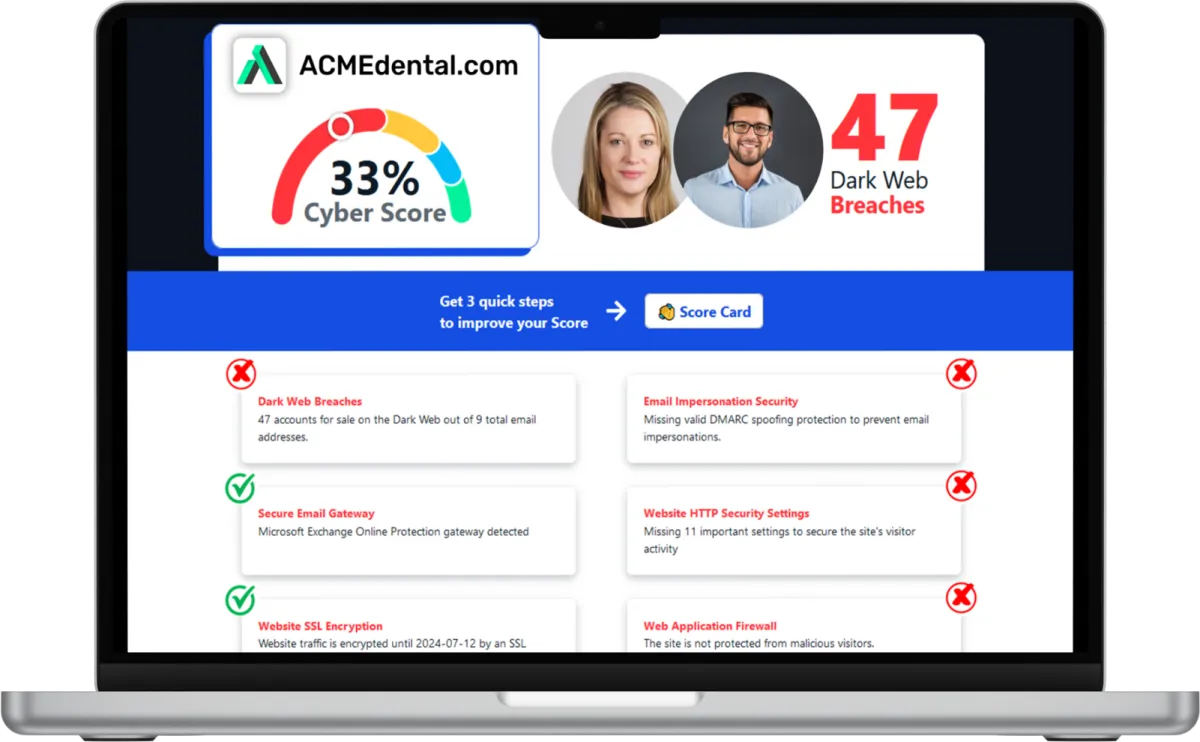
Want to see your Score? Get it in 30 seconds!
If You’ve Been Dealing with IT Challenges,
You’re Not Alone

Sean Inman
Founder & CEO
Inman Technologies is Here to Help.
Inman Technologies is a leading managed IT service provider in Fort Worth, TX, offering a comprehensive selection of outsourced IT support to businesses in Fort Worth, TX, and the surrounding areas, including Aledo, Willow Park, Hudson Oaks, Weatherford, TX, and Oklahoma City and Edmond, OK. We specialize in providing IT support and Cybersecurity services to meet the unique needs of businesses.
Call 682-882-9344 today for IT support tailored to your needs.
Schedule an Appointment Today
Our IT Support Services
Our IT services provide a structured approach through system monitoring, responsive help desk support, and one clear point of contact.
We identify recurring problems, address their causes, and keep support organized so your team can stay focused and productive each day.
IT Help Desk
Your team should reach a real person when something breaks. Too often, businesses wait on hold or send an email into a queue with no timeline. Our IT help desk gives your staff in Fort Worth a direct line to support.
Direct access to our help desk during business hours.
Support for common software, hardware, and login issues.
Remote troubleshooting for most everyday requests.
Escalation to a technician when needed.
Network Management
A stable connection should be something you never think about. Instead, many offices in Fort Worth deal with dropped connections, slow transfers, and strained Wi-Fi. We manage your network so it holds up under daily use.
Monitoring for outages, slowdowns, and unusual traffic.
Configuration of routers, switches, and access points.
Regular checks on network performance.
Documentation of your setup for faster troubleshooting.
Cybersecurity Services
Every business wants confidence that client and case files are protected. But threats evolve, and one weak password or outdated system can open the door to a breach. Our cybersecurity reduces that risk at every layer.
Endpoint protection installed across company devices.
Email filtering to help reduce phishing attempts.
Regular updates to close known vulnerabilities.
Guidance on access controls and passwords.
Backup and Disaster Recovery
Losing a day of case files or project records can set a team back weeks. Backups that run occasionally, or go untested, offer false security. We set up routines that help you recover quickly.
Scheduled backups of critical files and systems.
Backup verification so data is recoverable.
Recovery support after accidental deletion.
Storage options built around how your team works.
Cloud Services
Teams splitting time between office, job sites, and home need file access without friction. When cloud tools are set up poorly, people end up emailing documents or losing versions. We configure systems that keep everyone aligned.
Setup and management of cloud email and file storage.
Access controls so the right people see the right files.
Support for remote and hybrid schedules.
Migration assistance when moving from local servers.
IT Consulting
Growing a business often means outgrowing systems that used to work fine. Without a plan, technology decisions get made in a hurry, right when something breaks. We provide IT consulting that looks ahead, so upgrades happen on your timeline.
Technology roadmaps aligned with growth plans.
Recommendations based on how your team works.
Guidance on replacement timing for hardware and software.
Support for planning office moves or expansions.
Harness the Power of AI for Your Business
At Inman Technologies, we bring cutting-edge AI solutions to businesses of all sizes. Our AI as a Service offerings are designed to simplify your operations, enhance customer experiences, and drive measurable growth. From automating customer interactions to optimizing your marketing strategies, we deliver secure, tailored AI tools that make your business smarter and more efficient.
What Clients Say About Us
Your Complete IT Solution Partner
I have had the good fortune to work with Inman Technologies for the past two years where they have managed and supported a full range of IT services from basic computer setup and software management to a complete overhaul or our servers and security protocols. Above all, we have developed a relationship with Sean and his team due to their thoroughness and quick response to all our needs.
President of Construction at Ashton Gray
Bobby Snyder
Trustworthy Partner, a Good Company with Integrity, that Cares
Inman Technologies has been the welcome answer for everything IT. Sean and his teams experience, knowledge, and guidance has been second to none. Some firms that we have worked with in the past specialize in one arena or another and have extraordinary fees associated with their services. Not Inman Technologies. iCloud Storage, Proprietary Servers & Software, Firewalls, and Security etc. You name it they can take care of all your needs and then some. Finally a firm that can take care of all our needs and source all the electronics necessary to make our IT needs run safely and more efficiently. We look forward to a successful relationship with one another for many years to come.

David Terres
Vice President at Ramon Franklin
Response times are fast and they always have a solution!
Inman Technologies not only understands tech services, they understand hospitality. They understand their clients and that's why I will forever use Inman Tech. Response times are fast and they always have a solution!
Cole Smith
Director of Leasing at Ashton Gray
Inman Technologies Delivers Affordable Excellence
Inman technologies has done such a great job securing our company technologies. Being a small company that grew quickly we needed a professional company that didn't cost us a fortune to take over our IT infrastructure. Sean was it!
Amanda Taylor
Vice President at Legacy Electric
Partners and products we support to deliver unparalleled productivity:




Business Technology Insights
Explore expert insights, trends, and expert advice on the ever-evolving landscape of information technology. Dive in to discover how we leverage cutting-edge solutions to empower businesses and drive innovation.

9 Signs That Your Smart Home Device Has Been Hacked
Smart home devices are becoming more popular and convenient. But they also pose some serious security risks.

5 Cybersecurity Predictions for 2024 You Should Plan For
Cybersecurity is a constantly evolving field. There are new threats, technologies, and opportunities emerging every year.

Workspaces, a VPN & More – Learn the Newest Microsoft ...
Microsoft Edge continues to redefine user experiences. This is due to Microsoft’s commitment to innovation.

The Third Place Work Policy Every Business Leader Will Need in 2026
How Coffee Shops and Coworking Spaces Can Create Cybersecurity Risks
Work now happens in many places, not just the office.
Employees today often work from coffee shops, coworking spaces, hotel lobbies, and job sites. These are often called “third places” meaning any work location that is not your office or your home.
These environments provide flexibility and convenience and can boost productivity.
However, they also introduce serious cybersecurity risks.
Without clear security standards for working outside the office, your business could unknowingly expose sensitive data, client information, and internal systems to cyberattacks.
This guide explains the policies and best practices business leaders need to protect their company while supporting a modern hybrid workforce.
The Hidden Risks of Third-Place Work
Public Wi-Fi Is a Major Vulnerability
Most public Wi-Fi networks are not built with business security in mind.
Public Wi-Fi includes any free or shared network outside of your company’s secured office environment, such as:
Coffee shops (Starbucks, local cafés, etc.)
Coworking spaces (WeWork, shared offices, hot desks)
Hotels and conference centers
Airports and airline lounges
Restaurants and fast-food chains
Libraries and community centers
Job sites using temporary or shared internet connections
Client guest Wi-Fi networks
Even though these networks are convenient, they are often unsecured or shared with dozens (or hundreds) of strangers at the same time.
Attackers can exploit these environments to:
Intercept login credentials
Monitor company email traffic
Steal confidential project data
Launch ransomware attacks through compromised devices
Even when Wi-Fi requires a password, that password is often posted publicly or shared with everyone in the building.
For businesses, just one insecure connection can quickly lead to a costly data breach.
Core Elements of a Third Place Security Policy
A good third place work policy should be simple, easy to enforce, and based on proven security controls.
1. Mandatory Secure Remote Access
Every employee working outside the office should use secure access tools.
Key requirements include:
VPN (Virtual Private Network)
Encrypts all traffic so attackers cannot intercept sensitive information.Zero Trust Network Access (ZTNA)
A modern alternative to VPN that limits access based on identity, device health, and location.
Best practice is to have VPN or secure access turn on automatically when connecting to any untrusted network.
2. Device Security and Endpoint Protection
Working in third places is only safe if the device is protected.
Your policy should require:
Company-managed laptops and phones (not personal devices)
Full disk encryption enabled
Automatic patching and updates
Advanced endpoint protection (EDR)
Standardized device management makes sure every employee starts with the same level of security.
3. Physical and Visual Security
Cybersecurity is not only about digital threats.
Public places also bring physical security risks.
Employees should follow practices like:
Using privacy screens to prevent shoulder surfing
Locking devices when stepping away
Never leaving laptops unattended
Using cable locks in coworking spaces
If a laptop is stolen, it can give someone direct access to your systems.
Behavior Controls That Reduce Risk
Technology is not enough on its own. Good security depends on daily habits.
Communication Discipline in Public
Employees should not discuss sensitive business topics in public, especially during phone calls.
Encourage:
Using headphones
Taking private calls away from crowds
Not having open conversations about clients, finances, or internal projects
Limit High-Risk Actions on Public Networks
Even with security measures, public Wi-Fi should always be considered high risk.
Employees should avoid accessing:
Payroll systems
Banking portals
Admin dashboards
Sensitive client documentation
If employees must access these systems, they should use strong authentication.
Executive-Level Policy Components You Need
A third place security policy should make expectations clear.
Every business policy should include:
What qualifies as a third place workspace
Approved tools (VPN, MFA, endpoint protection)
Employee responsibilities
Incident reporting procedures
Compliance requirements
Annual review and updates
A policy is only effective if it is simple to follow and enforce.
Strengthening Control With Authentication and Monitoring
Multi-Factor Authentication (MFA)
MFA is one of the best ways to protect against stolen passwords.
Even if someone’s credentials are stolen, MFA can prevent attackers from gaining access.
Best practices include:
Require MFA for all cloud apps, email, and remote access
Use app-based authentication or hardware keys
Try not to use SMS-only MFA if you can avoid it
Monitoring and Detection
Businesses should deploy systems that can detect:
Unusual remote login behavior
Devices connecting from risky locations
Suspicious access attempts
Modern cybersecurity focuses on preventing problems before they happen.
Training: The Human Firewall
Policies do not work without proper training.
Employees need real-world awareness of:
Phishing attacks
Fake Wi-Fi networks
Social engineering tactics
Secure habits while traveling or working remotely
With regular training, your employees become a security strength instead of a weakness.
Construction and Field Team Considerations
For industries like construction, employees often work from:
Job trailers
Temporary networks
Client offices
Field locations with limited infrastructure
Recommended best practices include:
Using secure mobile hotspots instead of open Wi-Fi
Standardizing device onboarding for job site teams
Ensuring cloud platforms have strong access controls and logging
Field teams need just as much protection as office staff.
Third Place Security Checklist
Use this quick checklist to see if you are ready:
VPN is mandatory on public networks
MFA is enforced across all critical systems
Devices are encrypted and centrally managed
Endpoint security is active on all laptops
Employees have completed security training
Incident reporting procedures are documented
Policy is reviewed at least annually
Conclusion: Flexibility Without Added Risk
Hybrid work is here to stay.
However, flexibility should not come at the expense of security.
By setting a clear third place work policy, using secure access controls, and training employees well, your business can support modern work without increasing cyber risks.
Secure Your Remote Workforce With Inman Technologies
At Inman Technologies, we help business leaders protect their teams, devices, and data, whether employees work in the office, at home, or from a coffee shop.
Schedule a consultation with our cybersecurity experts to:
Build or audit your third place security policy
Deploy secure remote access tools
Protect field teams
Train employees against real-world threats
Or download our Remote Work Security Policy for business owners.
Contact Inman Technologies today to secure your workforce, no matter where work takes place.

Frequently Asked Questions About IT Support in Fort Worth
What is IT support?
IT support covers the help, monitoring, and maintenance that keep computers, networks, and software running for a business. As your IT company, we provide IT support built around help desk access and network management for your team in Fort Worth.
What does IT support include?
IT support usually includes help desk access, network monitoring, data backup, and patch management, plus cybersecurity protection. We build our IT support around what a business in Fort Worth actually uses, not a fixed bundle.
How is managed IT support different from calling someone when something breaks?
Managed IT support works ahead of problems instead of reacting to them. We monitor systems and flag issues early, so IT support becomes routine rather than a last resort.
Can cybersecurity be included as part of IT support?
Yes. It is part of the IT support we provide, not a separate add-on. Endpoint protection, email filtering, and regular updates are built into how we manage systems for businesses in Fort Worth.
Do I still need an in-house IT person if I use your IT support?
Some businesses keep an internal point of contact, while others rely on us entirely. Our IT support works either way, handling daily monitoring and help desk needs so an in-house hire can focus on bigger projects.
Let's Build A Better Network Togetaher
Reliable technology starts with reliable infrastructure. As your IT company, we help businesses across Dallas Fort Worth create organized structured cabling that supports daily operations and prepares the network for future growth. Whether you are moving into a new office, renovating your space, or replacing aging infrastructure, we are ready to help you plan the right solution.
If you are looking for structured cabling backed by practical IT consulting and dependable IT services, contact us today. We will assess your current environment, explain your options clearly, and build a cabling system that supports your business now and as your technology continues to evolve.
© Copyright 2026 Inman Technologies. Built in partnership with Tech Pro Marketing. | Privacy Policy | SMS Opt-In


